

Tealium EventStream and AudienceStream provide a server-side foundation for collecting events, managing customer attributes, building audiences and activating data through vendor integrations. Their value depends on the quality of the implementation surrounding them. A technically complete configuration can still produce unreliable results if the event model, identity strategy, consent controls and connector governance are not defined in advance.
EventStream primarily receives, validates, and routes event data. AudienceStream uses that data to maintain visitor profiles, apply enrichments, create audiences and trigger audience-based actions. The two products are complementary, but they should not be treated as interchangeable components.
The approach does not, by itself, solve poor source instrumentation, inconsistent business definitions, incomplete consent signals, unresolved identity conflicts or weak downstream data governance. It also does not replace a measurement strategy, a properly managed data layer or ongoing quality assurance.
1. Establish the role of each component
EventStream is the event collection and delivery layer. It receives data through Tealium Collect and can route events to external systems through event feeds and connectors. Its primary concerns are:
- Event ingestion.
- Event specifications and required attributes.
- Data quality validation.
- Event feeds and triggers.
- Mappings to vendor APIs.
- Delivery monitoring and error handling.
AudienceStream is the customer profile and audience management layer. According to Tealium’s introduction to AudienceStream, it supports identity resolution, visitor data enrichment, customer segmentation and real-time integrations.
The distinction is operationally important. An event connector may send a purchase event whenever a qualifying event is received. An AudienceStream connector may send an action when a visitor joins a defined audience. These are different triggers and should be designed for different use cases.

Recommended action: Document the intended role of EventStream and AudienceStream before configuration begins. Each proposed integration should be classified as either event-based, audience-based or unsuitable for the platform.
2. Select an appropriate collection architecture
EventStream and AudienceStream depend on a reliable data collection method. For web implementations, Tealium documents three principal installation options:
- Tealium iQ Tag Management with
utag.jsand the Tealium Collect tag. - Google Tag Manager with the Tealium Collect tag.
- Google Tag Manager with the Tealium Universal Tag deployed as Custom HTML.
The appropriate option depends on the existing tag management environment, the maturity of the data layer and the extent to which Tealium iQ is required for data preparation or vendor deployment. The official Tealium installation guidance identifies Tealium iQ and Tealium Collect as the recommended basic setup where no existing tag manager is in place.
A Google Tag Manager implementation may provide a quicker route to data collection where event tracking and the data layer are already reliable. However, sending the complete dataLayer object to EventStream does not automatically make that data suitable for AudienceStream. Naming, data types, identity fields and consent signals still require assessment.
For applications and backend systems, the implementation must account for the relevant Tealium Collect libraries, APIs or data source configurations. Each source should be identifiable and governed independently.
Recommended action: Create a source inventory covering websites, mobile applications, backend systems and offline feeds. Record the collection method, owning team, environment, profile and expected event volume for each source.
3. Design the event model before configuring attributes
Event Specifications and event attributes form the practical data model for EventStream. Tealium describes event specifications as a way to define the events to be tracked and the attributes required for those events.
A specification should be based on business processes rather than on the current contents of a website’s data layer. For example, an ecommerce model may distinguish between:
product_viewedcart_updatedcheckout_startedpurchase_completedrefund_processed
Each event should have a documented set of attributes, including data type, purpose, source and expected behaviour. A purchase event may require a transaction identifier, currency, value, product details and customer or visitor identifiers. A page view may require a page name, content group and consent state but not transaction attributes.
Event names should be stable and unambiguous. Reusing a generic event name for materially different actions makes feeds, enrichments and connector logic harder to maintain. Similarly, inconsistent data types can prevent reliable audience rules and vendor mappings.
The Tealium EventStream event specification documentation should be used alongside an organisation’s measurement specification and data dictionary.
Recommended action: Approve the event dictionary, attribute definitions and data types before creating production feeds or connectors. Measurement governance should precede platform configuration.
4. Define identity and profile stitching rules
AudienceStream profiles depend on the quality and consistency of identity signals. Anonymous identifiers, login identifiers and other customer keys must be handled according to a defined identity resolution strategy.
A common pattern is:
- An anonymous visitor interacts with a website or application.
- Tealium receives events associated with an anonymous identifier.
- The visitor authenticates or provides a recognised customer identifier.
- Subsequent events include the recognised identifier.
- AudienceStream applies the configured stitching rules to associate activity with the relevant profile.
This process requires careful treatment. A customer identifier should not be accepted merely because it is present. Validation, normalisation, hashing requirements, persistence and consent implications must be documented. The same identifier must also represent the same entity consistently across systems.
Tealium provides guidance on visitor stitching and visitor ID attributes. These resources should be considered alongside internal identity management and customer data policies.
AudienceStream does not correct an identity model that is structurally ambiguous. Incorrect stitching can create profiles that combine unrelated individuals or fragment one customer into multiple profiles. Both outcomes can affect audiences, personalisation and downstream activation.
Recommended action: Define the permitted identity attributes, precedence rules, normalisation requirements and stitching scenarios. Test anonymous-to-known transitions and cross-device journeys before audience activation.
5. Configure connectors as controlled data products
Connectors are the point at which Tealium data is transmitted to external vendors. Tealium describes a connector as an integration that transmits data in real time, with actions triggered by an event feed or by a visitor’s status in an audience.
Connector design should address:
- The business purpose of the destination.
- The source feed or audience.
- The trigger condition.
- Required attributes and mappings.
- Authentication and credential ownership.
- Consent category and enforcement conditions.
- Error, retry and escalation procedures.
- Data retention and vendor-side deletion requirements.
Event connectors are appropriate where the action is tied to an individual event, such as sending a conversion or updating a transaction record. Audience connectors are appropriate where the action depends on audience membership, such as adding a visitor to a marketing segment or notifying a CRM system of a lifecycle change.
Tealium documents retry behaviour for failed connector actions, but retries do not remove the need for monitoring. A successful retry may conceal an upstream data quality issue if action volumes or error rates are not reviewed.
The official connector documentation also states that restricted data settings do not apply to connectors. Attributes marked as restricted data may therefore still be included in connector payloads. This is a material governance consideration.
Recommended action: Maintain a connector register that records every active action, its source, destination, mapped fields, consent category, owner and retirement criteria. Review the register during each release and vendor change.
6. Treat consent as an input to processing
Consent should be represented in the event model and enforced at the point where data is processed or activated. A consent banner or CMP alone does not demonstrate that every downstream action is governed correctly.
Consent signals may originate from a CMP, application preference centre, account system or another approved source. They should be normalised and passed into the collection flow in a form that can be evaluated against the relevant processing purpose.
Tealium provides documentation for server-side consent management and consent orchestration. Connector actions also have consent categories shown in the action details. These categories should be reviewed rather than assumed.
A consent implementation must account for:
- Initial consent state.
- Consent withdrawal.
- Consent changes across sessions and devices.
- Regional requirements.
- Anonymous and authenticated users.
- Audience membership created before a withdrawal.
- Historical data and deletion requests.
- Destinations that apply their own consent controls.
This is an area where CMP integration services and a wider data privacy implementation programme may be required alongside Tealium configuration.

Recommended action: Map each event feed, audience and connector action to a documented processing purpose. Test both consent granted and consent refused states, including withdrawal after profile creation.
7. Validate the full data path
Validation should cover the complete sequence from source event to downstream action. Checking only whether an event appears in EventStream is insufficient.
A suitable test should confirm:
- The source generates the intended event.
- The payload contains the correct event name and attributes.
- Event Specifications identify missing or invalid data.
- Event feeds include or exclude the event as intended.
- AudienceStream enrichments update the correct attribute.
- Audience rules evaluate correctly.
- Connector triggers operate under the correct conditions.
- Consent restrictions prevent unauthorised actions.
- The destination receives the expected payload.
- Errors and retries are visible to the operational team.
Tealium’s Trace functionality provides a way to follow test activity through the server-side configuration. Live Events can also be used to inspect incoming data in real time.
Automated quality assurance should supplement, rather than replace, Trace-based testing. TagDataTrust’s work in analytics data quality and tagging implementation services reflects the need for both implementation accuracy and ongoing monitoring.
Recommended action: Create a test matrix covering key events, identity states, consent states, audience transitions and connector outcomes. Store the results with the relevant Tealium version and release record.
A practical implementation approach
A controlled implementation can be organised into the following phases:
- Discovery
Document sources, business use cases, vendors, consent requirements, identity signals and existing tag management configurations. - Data model
Define event names, attributes, data types, identity fields and consent signals. Resolve differences between web, app and backend terminology. - Collection
Configure data sources and Tealium Collect. Validate payloads before creating extensive downstream logic. - EventStream configuration
Create event specifications, attributes, feeds and event connectors. Begin with a limited number of high-value use cases. - AudienceStream configuration
Define visitor, visit and omnichannel attributes, enrichments, audiences and stitching rules. - Consent and governance
Configure purpose-based controls, connector consent conditions, access permissions and operational ownership. - Quality assurance
Use Live Events, Trace, destination-side validation and automated monitoring. Test both expected and failure scenarios. - Release and operation
Publish through controlled environments, maintain version records and monitor connector performance, event volumes, audience sizes and data quality indicators.
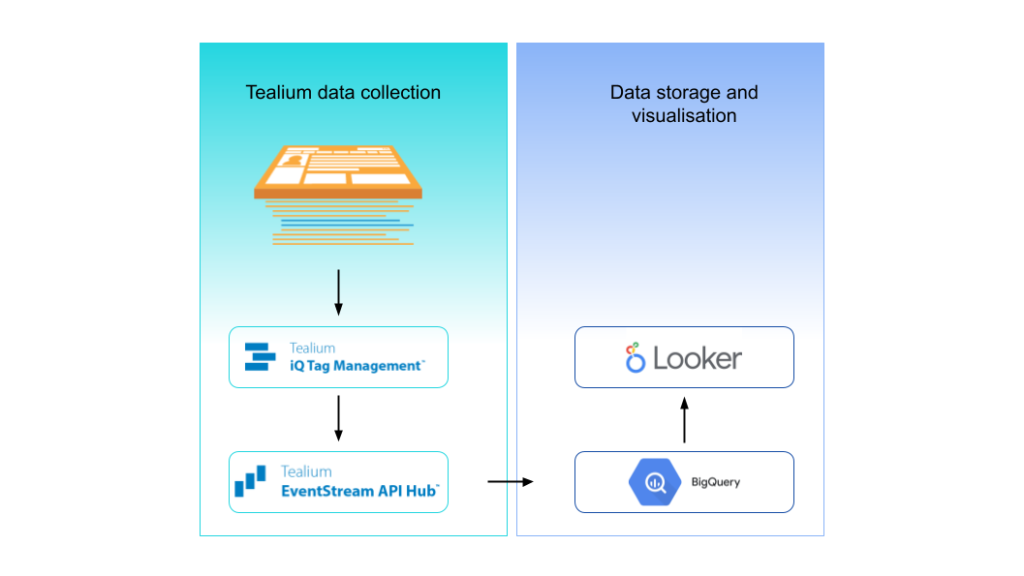
An architecture diagram can be useful during stakeholder review, particularly where collection, server-side processing, cloud storage and vendor activation are distributed across several teams.
Conclusion
Tealium EventStream and AudienceStream can provide a structured foundation for event collection, profile management and real-time activation. The implementation remains dependent on disciplined event design, reliable identity signals, explicit consent controls and continuous validation.
The most appropriate starting point is not the connector catalogue. It is a documented data model and a clear definition of the decisions the platform is expected to support. Once those foundations are in place, EventStream and AudienceStream can be configured with greater control, clearer ownership and lower operational risk.
For organisations using Tealium to support measurement, activation and governance objectives, the emphasis should remain on specification quality, operational control and validation across the full data path.
If you’d like to hear more on this topic and set up a 1:1 call with us, please use the contact form. Contact a Consultant